
Please pay attention to the MySQL SQL Insert Into Ststement below :
insert into `m_statis`(`idstatis`,`jenisstatis`) values (1,'Sambutan');
insert into `m_statis`(`idstatis`,`jenisstatis`) values (2,'Visi dan Misi');
insert into `m_statis`(`idstatis`,`jenisstatis`) values (3,'Roadmap penelitian Unud');
insert into `m_statis`(`idstatis`,`jenisstatis`) values (4,'Kebijakan penelitian Unud');
insert into `m_statis`(`idstatis`,`jenisstatis`) values (5,'TOR penelitian Unud');
insert into `m_statis`(`idstatis`,`jenisstatis`) values (6,'Tatalaksana penelitian');
insert into `m_statis`(`idstatis`,`jenisstatis`) values (7,'Kontak');
and MySQL SQL Insert Into Ststement below :
insert into `m_statis`(`idstatis`,`jenisstatis`) values (1,'Sambutan'),(2,'Visi dan Misi'),(3,'Roadmap penelitian Unud'),(4,'Kebijakan penelitian Unud'),(5,'TOR penelitian Unud'),(6,'Tatalaksana penelitian'),(7,'Kontak');
The First Statement is Call Non Bulk SQL Insert Statement, and The Second is Bulk SQL Insert Statement. This Bulk SQL Insert Statement can increase potential of Restore Database Error. A big size of database can cause a out of memory while Execute BULK Insert Statement. A Non Bulk Insert Statement can reduce potential of Restore Database Error, because it execute using smaller memory size and per single Table Row.
So I Recommend you to use Non Bulk SQL Insert Statement, even if the SQL Filesize can be bigger, the safety is more Important.
How can we provide a SQL File that contain Non Bulk SQL Insert Statement,
the simple way can be found Here

Database Programmer Usually Backup MySQL Database Safely as SQL File with SQL Yog. Because it was desktop software and user friendly. Backup MySQL Database Safely as SQL File with SQL Yog sometimes not safe causing by wide database.
The Backup of MySQL Database can be Safely if we don't use Bulk Insert Query, I mean a single Insert into Query to perform a inserting table.
How we do not use bulk insert in Database Backup?
Simply release check at the backup process.

This manner can reduce potential of Restore Database Error. A big size of database can cause a out of memory while using BULK Insert Statement.
A Brief Explanation of BULK SQL Insert Statement and Non BULK SQL Insert Statement
can be Found Here
The Backup of MySQL Database can be Safely if we don't use Bulk Insert Query, I mean a single Insert into Query to perform a inserting table.
How we do not use bulk insert in Database Backup?
Simply release check at the backup process.

This manner can reduce potential of Restore Database Error. A big size of database can cause a out of memory while using BULK Insert Statement.
A Brief Explanation of BULK SQL Insert Statement and Non BULK SQL Insert Statement
can be Found Here
With iptraf we know how much traffic in and traffic out in our machine. How we use it below is the step by step.
1. Open Terminal in Fedora Core
2. Simply write iptraf and Choose Detail Interface Statistic
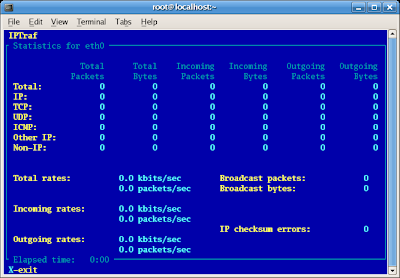 In Picture Above Mean iptraf catch no traffic in and no traffic out with all value is Zero
3. Try to ping another machine / computer like this picture below.
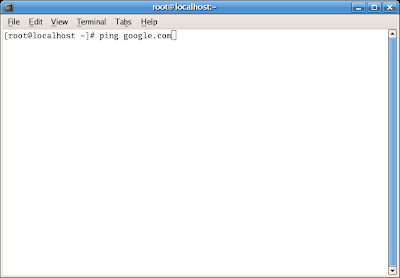
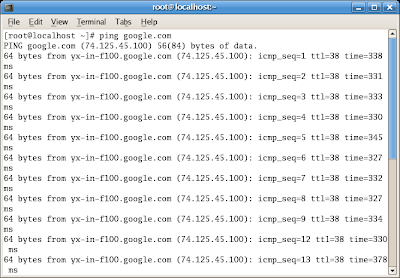
Ping cause a traffic out (sends / request) and traffic in (repply), so the value of indicator can be view in iptraf like pictute below :
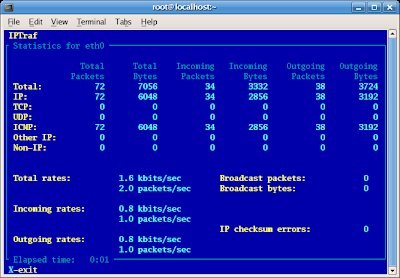
That was how we can use iptraf in Fedora Core.
1. Open Terminal in Fedora Core
2. Simply write iptraf and Choose Detail Interface Statistic
 In Picture Above Mean iptraf catch no traffic in and no traffic out with all value is Zero
3. Try to ping another machine / computer like this picture below.


Ping cause a traffic out (sends / request) and traffic in (repply), so the value of indicator can be view in iptraf like pictute below :

That was how we can use iptraf in Fedora Core.
Subscribe to:
Posts (Atom)
